Use Watt with AI Coding Agents
Problem
You want an AI coding agent (Claude Code, Cursor, GitHub Copilot, Gemini CLI, and others) to set up and run Platformatic Watt for you, instead of writing watt.json and wiring up dependencies and deployment manifests by hand. You need the agent to:
- Detect your framework and generate a correct
watt.json - Install the right
wattpmand@platformatic/*packages - Produce Docker, Kubernetes, and cloud deployment configuration
- Guide you through
wattpmCLI commands, observability, scheduling, and profiling
When to use this solution:
- You are starting a new Watt project or porting an existing application
- You already use an AI coding agent and want it to follow Watt best practices
- You want consistent, repeatable Watt setup across projects and teammates
Solution
Platformatic publishes an official Agent Skill for Watt. A skill is a set of Markdown instructions that a skills-compatible agent reads and follows. The Watt skill tells your agent how to set up, configure, and deploy Watt, so you do not have to spell out each step.
The skill follows the Agent Skills open standard, so it works with any skills-compatible agent. Loaded into Claude Code, it also adds slash commands.
The skill is maintained in the platformatic/skills repository.
Install the skill
For any skills-compatible agent:
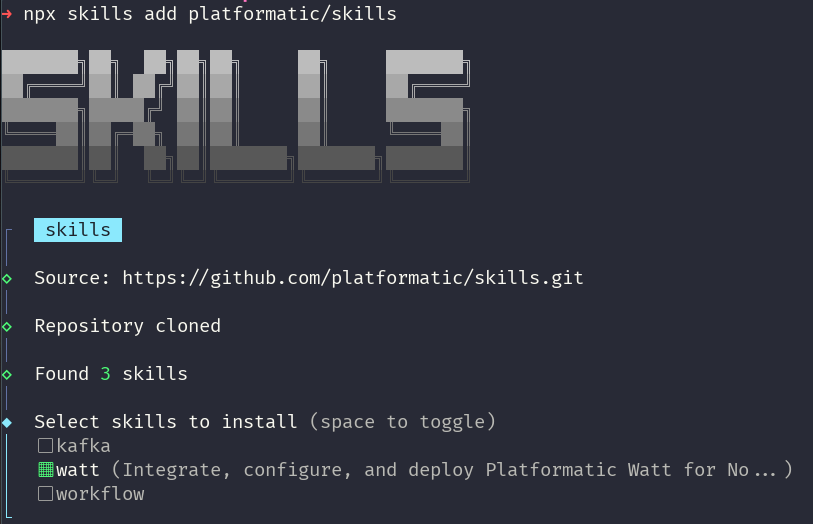
npx skills add platformatic/skills
The installer clones the repository and lets you pick which skills to install. Select watt (and optionally kafka and workflow):
Alternatively, clone the repository and point your agent at the skills/ directory:
git clone https://github.com/platformatic/skills.git
For Claude Code, load it as a plugin to enable slash commands:
claude --plugin-dir /path/to/skills
Use the skill
Once the skill is installed, describe what you want in plain language. The agent matches the request against the skill and runs the matching workflow. For example:
- "Add Watt to this Next.js project"
- "Generate a Dockerfile for my Watt app"
- "Deploy this to Kubernetes"
- "Create a multi-service enterprise setup"
- "Capture a CPU profile for my Watt app with pprof"
Claude Code slash commands
When the skill is loaded as a Claude Code plugin, it exposes argument-based slash commands. These are specific to Claude Code and are not part of the Agent Skills standard:
/watt                  # auto-detect the framework and integrate Watt
/watt init nextjs      # integrate with a framework hint
/watt deploy docker    # generate Docker configuration
/watt deploy k8s       # generate Kubernetes manifests
/watt enterprise       # multi-service setup
/watt migrate          # migrate an existing application
/watt cli              # wattpm CLI reference
/watt status           # check Watt configuration health
What the skill can do
| Capability | Description |
|---|---|
| Framework detection | Identifies Next.js, Nuxt, Nitro, React Router, TanStack Start, Vite, Remix, Astro, NestJS, Express, Fastify, Koa, WordPress, Laravel, and PHP |
| Configuration generation | Creates a watt.json tuned to the detected framework |
| Dependency installation | Installs wattpm and the matching @platformatic/* package |
| Deployment automation | Generates Docker, Kubernetes, and cloud (Fly.io, Railway, Render) configuration |
| CLI guidance | Explains wattpm commands such as create, inject, logs, ps, and pprof |
| Observability | Sets up logging (Pino), tracing (OpenTelemetry), and metrics (Prometheus) |
| Scheduled jobs | Configures cron-based tasks with retry support |
| Performance profiling | Captures CPU profiles and heap snapshots, and generates flamegraphs |
Supported frameworks
| Framework | Package | Detection |
|---|---|---|
| Next.js | @platformatic/next | next.config.{js,ts,mjs} |
| Nuxt | @platformatic/nuxt | nuxt.config.{ts,js,mjs} |
| Nitro | @platformatic/nitro | nitro or nitropack in dependencies |
| React Router | @platformatic/react-router | react-router.config.{ts,js} |
| TanStack Start | @platformatic/tanstack | @tanstack/react-start in dependencies |
| Vite | @platformatic/vite | vite.config.{js,ts,mjs} (fallback for Vite apps) |
| Remix | @platformatic/remix | remix.config.js |
| Astro | @platformatic/astro | astro.config.{mjs,ts} |
| Express | @platformatic/node | express in dependencies |
| Fastify | @platformatic/node | fastify in dependencies |
| Koa | @platformatic/node | koa in dependencies |
| NestJS | @platformatic/node | nest-cli.json or @nestjs/core |
| WordPress | @platformatic/php | wp-config.php |
| Laravel | @platformatic/php | artisan plus composer.json |
| PHP | @platformatic/php | composer.json plus public/index.php |
Several frameworks build on Vite (Nitro, React Router, TanStack Start, Remix, Astro) and ship a vite.config.*. The agent matches the specific framework first and falls back to @platformatic/vite only when no more specific signal is present.
Requirements
- Node.js v22.19.0 or higher
- A skills-compatible agent (Claude Code, Cursor, GitHub Copilot, Gemini CLI, and others)
Related skills
The platformatic/skills repository also ships companion skills:
kafka- event-driven microservices with@platformatic/kafkaand kafka-hooks, including migrations from KafkaJS and node-rdkafkaworkflow- building applications with the Vercel Workflow SDK against a self-hosted Platformatic Workflow Service via@platformatic/world