Run Next.js Image Optimizer as a Dedicated Service
In this guide, you will configure Platformatic Next to run in Image Optimizer mode as a standalone service.
Instead of running a full Next.js application in the same process, you expose only the /_next/image endpoint and delegate image optimization to a dedicated component.
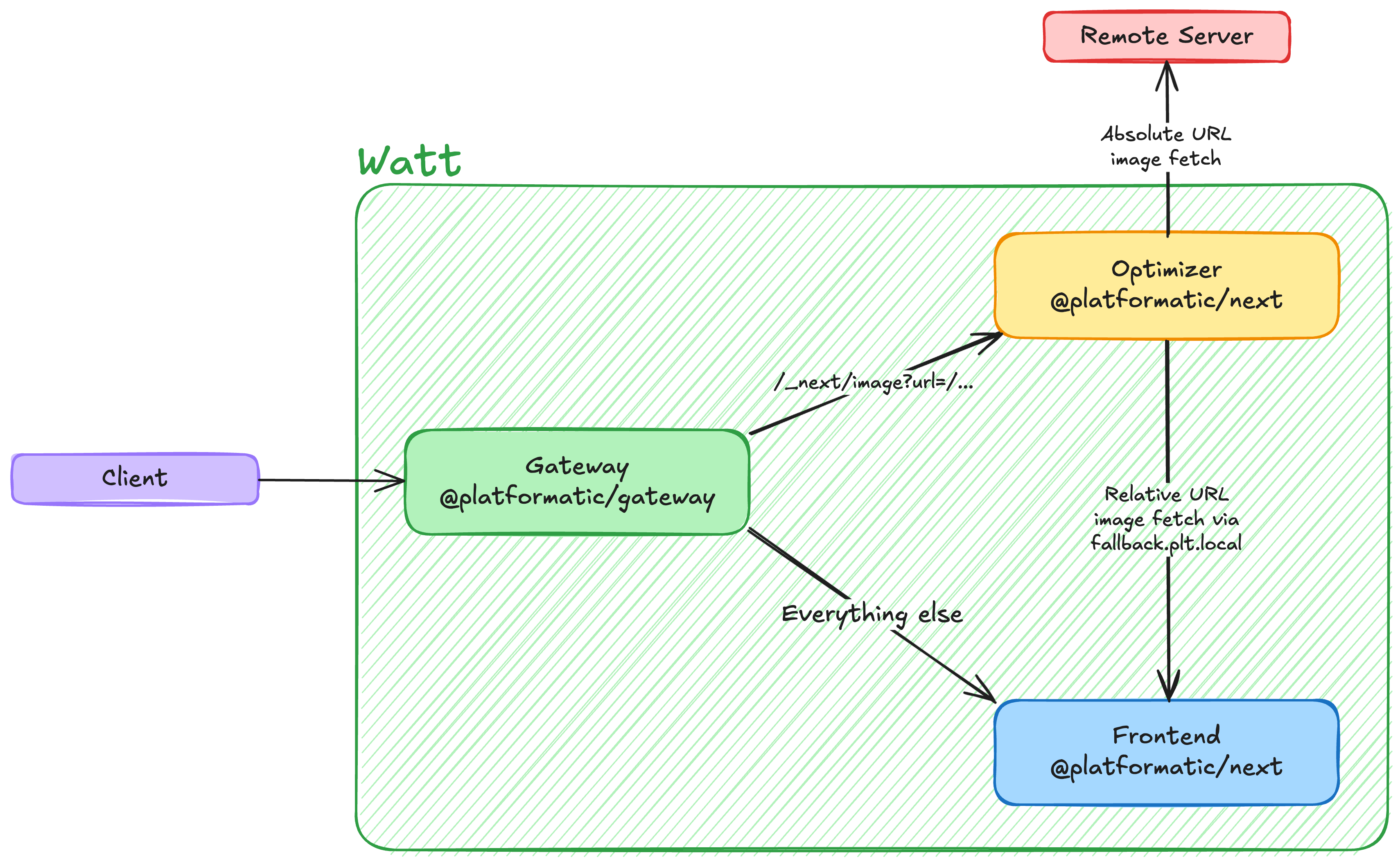
Why this architecture
Using a dedicated optimizer service behind Gateway has practical advantages:
- Scalability: image transformations are CPU-intensive and can be scaled independently from frontend rendering.
- Operational isolation: spikes on image traffic do not starve your frontend workers.
- Centralized behavior: width/quality validation, retry policy, timeout, and cache/storage settings are configured once.
- Flexible storage backends: in-memory for local dev, filesystem for simple deployments, Redis/Valkey for multi-instance environments.
- Runtime-native service discovery: relative image paths are fetched from a sibling application (for example
http://frontend.plt.local) without hardcoding external URLs.
Prerequisites
Before starting, make sure you have:
- npm available on your machine
wattpmavailable throughnpx wattpm(or installed globally)
What you will build
You will create a runtime with three applications:
- gateway (entrypoint)
- runs
@platformatic/gateway - routes only
GET /_next/imagetooptimizerusingproxy.routes; everything else goes tofrontend
- runs
- frontend
- runs your regular Next.js app (pages, APIs, and static assets)
- serves static files (for example
public/platformatic.png) - provides original assets for relative image URLs
- optimizer
- runs
@platformatic/nextin Image Optimizer mode - exposes only
/_next/image
- runs
At the end, you will test:
- optimization of a relative URL (
/platformatic.png) resolved through local service discovery - optimization of an absolute URL (
https://...) fetched directly
1) Create a runtime with three applications
Create this structure:
my-runtime/
  watt.json
  web/
    gateway/
      watt.json
      package.json
    frontend/
      watt.json
      package.json
      next.config.js
      public/
        platformatic.png
      src/
        app/
          page.jsx
    optimizer/
      watt.json
      package.json
      next.config.js
In this setup:
gatewayis the external-facing entrypointfrontendis where relative assets are fetched fromoptimizerhandles only/_next/image
2) Configure the runtime
Create my-runtime/watt.json:
{
  "$schema": "https://schemas.platformatic.dev/@platformatic/runtime/3.0.0.json",
  "entrypoint": "gateway",
  "applications": [
    {
      "id": "gateway",
      "path": "./web/gateway"
    },
    {
      "id": "frontend",
      "path": "./web/frontend"
    },
    {
      "id": "optimizer",
      "path": "./web/optimizer"
    }
  ]
}
Why this configuration?
entrypoint: "gateway"means incoming runtime traffic goes first to Gateway.- Gateway routes by method + path (via
proxy.methodsandproxy.routes). frontendandoptimizerare in the same runtime, so service discovery works automatically.frontendis reachable fromoptimizerashttp://frontend.plt.local.
3) Configure Gateway with route-based proxying
Create my-runtime/web/gateway/watt.json:
{
  "$schema": "https://schemas.platformatic.dev/@platformatic/gateway/3.0.0.json",
  "gateway": {
    "applications": [
      {
        "id": "frontend",
        "proxy": {
          "prefix": "/",
          "routes": ["/*"]
        }
      },
      {
        "id": "optimizer",
        "proxy": {
          "prefix": "/",
          "routes": ["/_next/image"],
          "methods": ["GET"]
        }
      }
    ]
  }
}
Why use proxy.routes?
/_next/imagerequests are routed tooptimizeronly.- all other requests are routed to
frontend. - this keeps image optimization isolated while the frontend app serves regular pages/assets.
4) Configure the optimizer application
Create my-runtime/web/optimizer/watt.json:
{
  "$schema": "https://schemas.platformatic.dev/@platformatic/next/3.38.1.json",
  "next": {
    "imageOptimizer": {
      "enabled": true,
      "fallback": "frontend",
      "timeout": 30000,
      "maxAttempts": 3
    }
  }
}
What these options mean
enabled: trueenables dedicated Image Optimizer mode.fallback: "frontend"resolves relative URLs againsthttp://frontend.plt.local.timeout: 30000sets a 30-second timeout budget for fetch/optimization jobs.maxAttempts: 3retries failed jobs up to 3 times.
5) Configure the frontend application
Create my-runtime/web/frontend/watt.json:
{
  "$schema": "https://schemas.platformatic.dev/@platformatic/next/3.38.1.json"
}
Then place a test image here:
my-runtime/web/frontend/public/platformatic.png
This makes /platformatic.png available from the frontend application.
Keep frontend as a standard Next.js app
frontend should be your full frontend application, not a stripped-down placeholder. Keep the same pages, route handlers, API routes, middleware, and static assets you would normally ship.
Minimal example (my-runtime/web/frontend/src/app/page.jsx):
import Image from 'next/image'

export default function Page () {
  return (
    <main>
      <h1>Frontend app served by frontend</h1>
      <Image src="/platformatic.png" alt="Platformatic logo" width={512} height={512} />
    </main>
  )
}
The optimizer service remains dedicated to /_next/image; all other application behavior continues to live in frontend.
6) Install dependencies
Define dependencies in each application folder.
6.1) Gateway package.json
Create or update my-runtime/web/gateway/package.json:
{
  "name": "gateway",
  "private": true,
  "dependencies": {
    "@platformatic/gateway": "^3.0.0"
  }
}
6.2) Frontend package.json
Create or update my-runtime/web/frontend/package.json:
{
  "name": "frontend",
  "private": true,
  "dependencies": {
    "@platformatic/next": "^3.38.1",
    "next": "^15.0.0",
    "react": "^19.0.0",
    "react-dom": "^19.0.0"
  }
}
6.3) Optimizer package.json
Create or update my-runtime/web/optimizer/package.json:
{
  "name": "optimizer",
  "private": true,
  "dependencies": {
    "@platformatic/next": "^3.38.1",
    "next": "^15.0.0",
    "react": "^19.0.0",
    "react-dom": "^19.0.0"
  }
}
6.4) Install in one pass (recommended)
From my-runtime/, run:
npx wattpm-utils install
7) Start the runtime
From my-runtime/, run:
npx wattpm start
By default, Runtime listens on http://127.0.0.1:3042 unless you configure a different host/port.
8) Test the optimizer endpoint
Test A: optimize an internal image (relative URL)
curl -i "http://127.0.0.1:3042/_next/image?url=/platformatic.png&w=1024&q=75"
Request flow:
- Gateway receives the request.
proxy.routesmatches/_next/imageand forwards tooptimizer.optimizerdetectsurl=/platformatic.pngis relative.- Source is resolved to
http://frontend.plt.local/platformatic.png. - The image is fetched and optimized.
- Gateway returns the optimized bytes.
Test B: optimize an external image (absolute URL)
curl -i "http://127.0.0.1:3042/_next/image?url=https%3A%2F%2Fexample.com%2Fimage.png&w=1024&q=75"
This request is forwarded by Gateway to optimizer, then fetched directly from the absolute URL.
Expected result
For valid requests, you should receive:
HTTP/1.1 200 OK- an image
content-type(for exampleimage/png)
9) Production topology: Gateway in front of your main Next.js app + optimizer
A common production setup is:
- one frontend Next.js application for pages and APIs
- one dedicated optimizer application
- one gateway entrypoint routing traffic between them
Example Gateway routing:
GET /_next/image->optimizer/*->frontend
web/gateway/watt.json:
{
  "$schema": "https://schemas.platformatic.dev/@platformatic/gateway/3.0.0.json",
  "gateway": {
    "applications": [
      {
        "id": "frontend",
        "proxy": {
          "prefix": "/",
          "routes": ["/*"]
        }
      },
      {
        "id": "optimizer",
        "proxy": {
          "prefix": "/",
          "routes": ["/_next/image"],
          "methods": ["GET"]
        }
      }
    ]
  }
}
web/optimizer/watt.json:
{
  "$schema": "https://schemas.platformatic.dev/@platformatic/next/3.38.1.json",
  "next": {
    "imageOptimizer": {
      "enabled": true,
      "fallback": "frontend"
    }
  }
}
In this model, relative image URLs are fetched from frontend.plt.local, while optimization workloads are isolated in the dedicated optimizer application.
10) Kubernetes ingress example (NGINX Ingress Controller)
If you expose frontend and optimizer as separate Kubernetes Services, you can route image requests at the ingress layer:
/_next/image->optimizerService- all other paths ->
frontendService
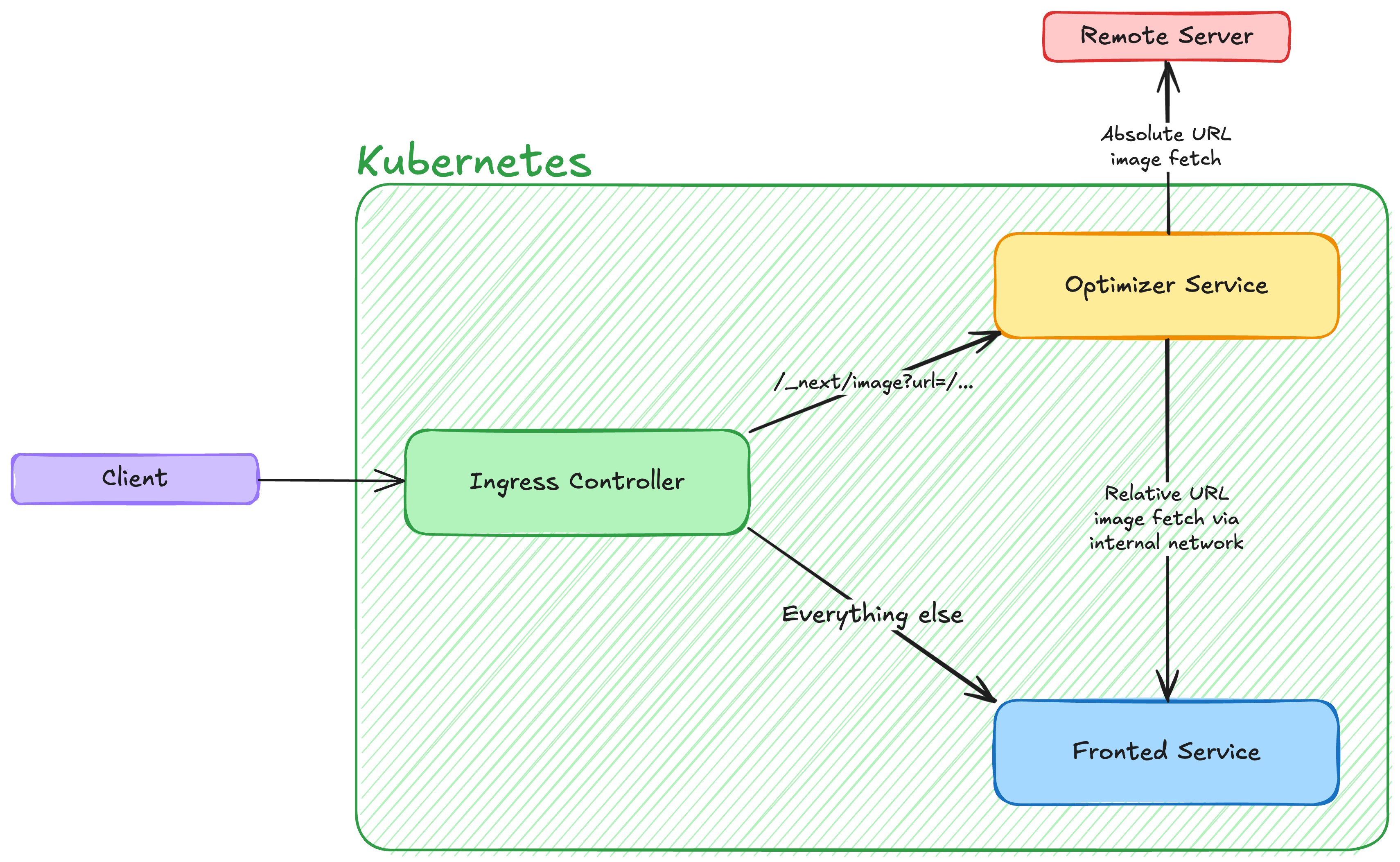
Example Ingress resource:
apiVersion: networking.k8s.io/v1
kind: Ingress
metadata:
  name: next-image-optimizer
  annotations:
    kubernetes.io/ingress.class: nginx
spec:
  rules:
    - host: app.example.com
      http:
        paths:
          - path: /_next/image
            pathType: Exact
            backend:
              service:
                name: optimizer
                port:
                  number: 3044
          - path: /
            pathType: Prefix
            backend:
              service:
                name: frontend
                port:
                  number: 3043
Notes:
pathType: Exacton/_next/imageprevents broad prefix matching from capturing the route.- Service names/ports must match your Kubernetes
Servicedefinitions. - If you expose only the Platformatic Runtime
gatewayservice externally, keep ingress pointing togatewayand letproxy.routeshandle/_next/imageinternally.
Storage options
Image optimization jobs run through a queue. You can control queue persistence with next.imageOptimizer.storage.
If you do not set storage, the default is in-memory storage.
1) Memory storage (default)
Best for local development or simple deployments where persistence across restarts is not required.
{
  "next": {
    "imageOptimizer": {
      "enabled": true,
      "fallback": "frontend",
      "storage": {
        "type": "memory"
      }
    }
  }
}
2) Filesystem storage
Useful when you want persistence on local disk (single node/container with writable volume).
{
  "next": {
    "imageOptimizer": {
      "enabled": true,
      "fallback": "frontend",
      "storage": {
        "type": "filesystem",
        "path": "./.next/cache/image-optimizer"
      }
    }
  }
}
3) Redis/Valkey storage
Recommended for distributed/multi-instance deployments.
{
  "next": {
    "imageOptimizer": {
      "enabled": true,
      "fallback": "frontend",
      "storage": {
        "type": "valkey",
        "url": "redis://localhost:6379",
        "prefix": "next-image:",
        "db": 0
      }
    }
  }
}
You can also use "type": "redis".
Next steps
- Put this optimizer pattern in front of one or more frontend applications.
- Configure Redis/Valkey storage for production.
- Tune
timeoutandmaxAttemptsbased on traffic profile and upstream reliability.
For full option details, see the Next.js Image Optimizer reference.